
YesYour team wants to add AI to a product that already handles patient data. Maybe it summarizes intake forms, drafts replies to members, or reads claim documents. Every model vendor you talk to promises HIPAA compliant AI. Meanwhile your security lead keeps asking a fair question: is AI HIPAA compliant at all, and if so, where?
At LaunchPad Lab, we’ll follow protected health information (PHI) from your app to the model and back, the way we do when we scope AI features for healthcare clients. At each step, we help you decide whether that part needs a business associate agreement (BAA), a de-identification step, or no PHI at all.
You’ll come away with a test you can run on your own architecture, and a plain answer on which AI plans come with a BAA.
TL;DR
- HIPAA-compliant AI is a property of your whole system: no AI model is compliant on its own.
- Is ChatGPT HIPAA compliant? Only on its API, healthcare, and enterprise plans, never on consumer plans or ChatGPT Business. Anthropic, Google, and AWS also sign a business associate agreement (BAA) only for API and enterprise plans.
- Follow protected health information (PHI) through four hops: prompt, vector database, model call, and logs.
- Strip identifiers the model doesn’t need, and keep the BAA whenever you’re unsure.
- Apps built with AI coding tools need the same HIPAA review before patients use them.
What is HIPAA-compliant AI?
No AI model is HIPAA compliant on its own. HIPAA-compliant AI is an AI system that handles patient data the way the HIPAA Privacy and Security Rules require, with a BAA covering every vendor in its path. The model is one important part of it. Your app, vector store, and logs matter just as much.
OpenAI’s own documentation says “accepting a BAA and enabling HIPAA compliance support do not, by themselves, make your application HIPAA compliant” (OpenAI). A vendor signs for its own service, and the rest of the data path is yours.
Which HIPAA rules apply to AI?
HIPAA doesn’t have a separate rulebook for AI. When people talk about HIPAA and AI, they mean the Privacy Rule and the Security Rule that already govern your patient portal and your other software. The Privacy Rule decides how much patient data your feature may use, and the Security Rule decides how you protect it.
1. The Privacy Rule: use only the patient data the task needs
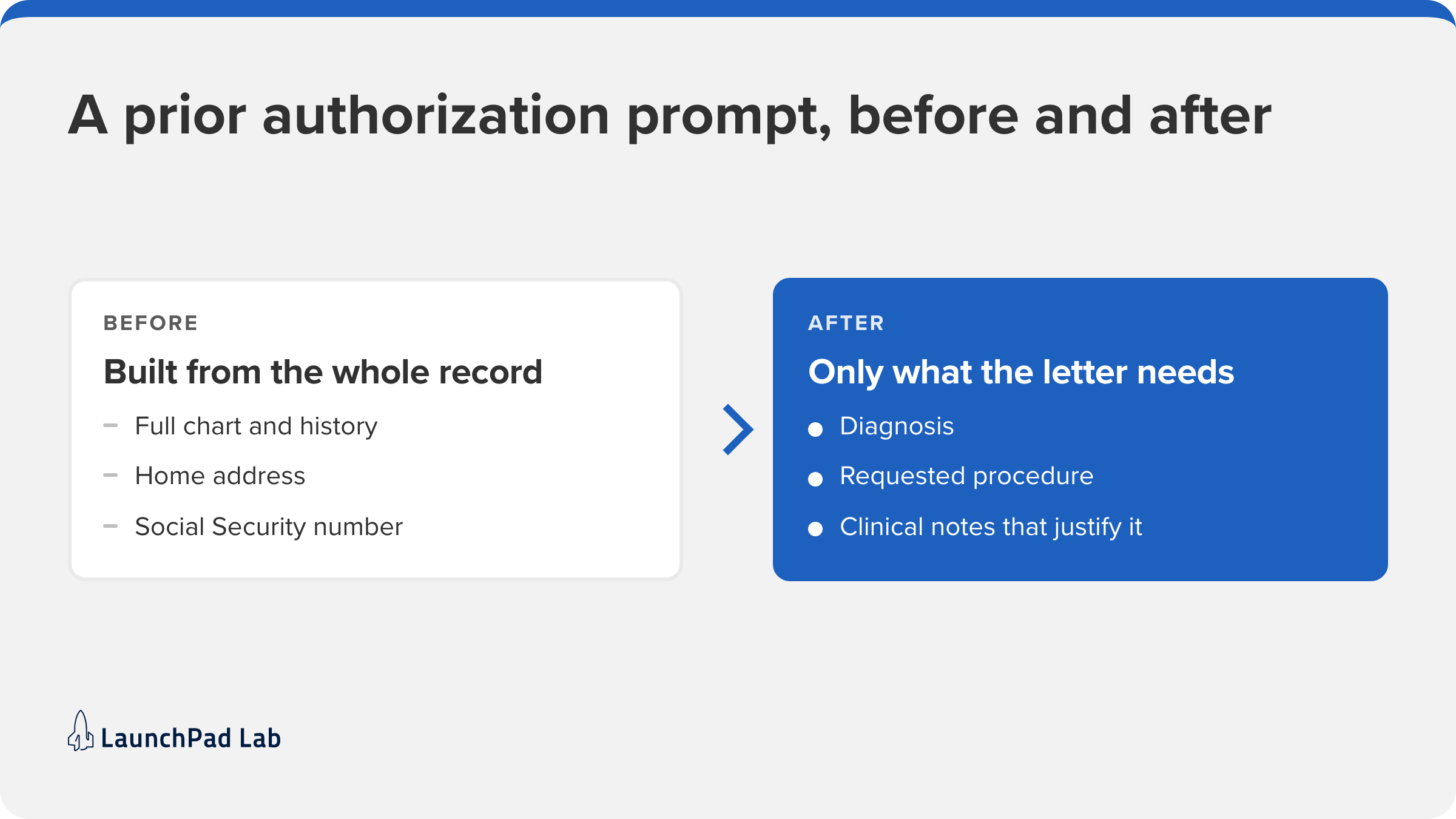
The Privacy Rule sets who can use and share PHI, and why. Its minimum necessary standard reaches an AI feature most directly. Covered entities and their business associates must make “reasonable efforts to limit protected health information to the minimum necessary to accomplish the intended purpose” (45 CFR 164.502).
For an AI feature, that comes down to two things:
- Only send what the task needs. Every prompt shares PHI with a model vendor, so pull the fields the task uses, not the whole record.
- Respect who can see what. An AI summary shown to billing staff shouldn’t include clinical notes they can’t open themselves.
Its exceptions, such as sharing with a provider for treatment, don’t clearly cover a prompt to a model vendor, so plan as if it applies and check edge cases with your compliance counsel.
Take a prior authorization letter. The model drafting it needs the diagnosis, the requested procedure, and the notes that justify it. It doesn’t need the patient’s address or Social Security number, so your app leaves those out of the prompt.
2. The Security Rule: what your AI feature has to protect
The Security Rule covers how you protect patient data that’s stored or sent electronically, which includes every prompt, embedding, and log line your feature creates. Its technical safeguards, in 45 CFR 164.312, are the five your engineers will build:
| Safeguard | What it asks for | What it means for your AI feature |
| Access control | Only authorized people and software reach PHI | Check the user’s role before pulling records or showing an answer |
| Audit controls | A record of activity involving PHI | Know who asked the model about which patient, and when |
| Integrity | No improper changes to PHI | A model’s draft never overwrites the record without a person’s approval |
| Person or entity authentication | Proof of who is accessing PHI | Every user, service, and API key is identified, with no shared keys |
| Transmission security | Protection for PHI in transit | Prompts and responses travel encrypted between every service |
Encryption sits inside two of these safeguards, access control and transmission security, as an “addressable” item. That doesn’t mean optional: you either use it or document why it isn’t reasonable and use an equivalent measure. HHS proposed making it mandatory in January 2025, but the federal regulatory agenda lists July 2027 as its target for a final rule. Encrypt anyway, and call it best practice rather than a legal requirement until the rule is final.
3. Where HIPAA stops, and the FTC takes over
HIPAA only covers health plans, providers, and clearinghouses (covered entities) and their business associates. When patients type health details into a consumer chatbot, the vendor “is neither a covered entity, nor a business associate” (2023 legal analysis). Consumer health apps answer to the Federal Trade Commission (FTC) instead, including its Health Breach Notification Rule. So the first HIPAA and AI question for any team is whether it’s a covered entity or works for one.
Is ChatGPT HIPAA compliant?
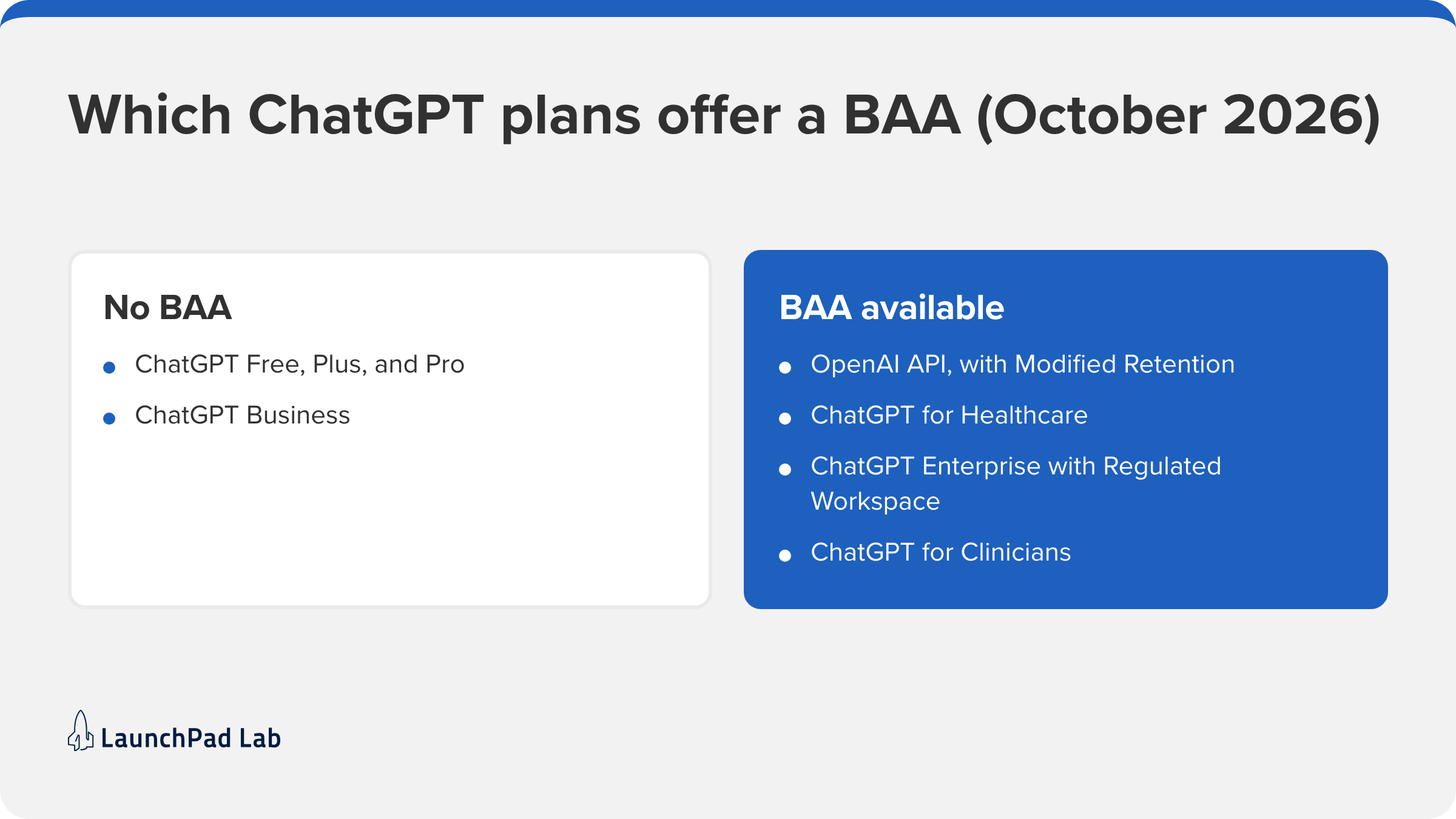
The consumer versions aren’t, and the business versions can be. OpenAI signs a BAA for its API and its healthcare and enterprise plans, but not for ChatGPT Business. Free, Plus, and Pro aren’t on its list of HIPAA-eligible products at all. If you’re looking for a medical version of ChatGPT, there are two: ChatGPT for Healthcare for organizations, and ChatGPT for Clinicians for individual clinicians.
ChatGPT is usually the first name teams ask about, but you’re probably comparing two or three model providers. The major ones follow OpenAI’s pattern: a BAA on API and enterprise plans, none on consumer plans. Here’s where each stands, per its own documentation in October 2026:
| Vendor and plan | BAA available? | What you need to set up |
| OpenAI API | Yes | A signed BAA, plus Modified Retention turned on for your organization. |
| ChatGPT for Healthcare, ChatGPT Enterprise with Regulated Workspace, ChatGPT for Clinicians | Yes | A BAA through OpenAI’s sales team. ChatGPT for Clinicians signs up inside the product. |
| ChatGPT Business | No | OpenAI says: “We do not offer a BAA for ChatGPT Business.” |
| Claude API, Claude in Microsoft Foundry, HIPAA-ready Enterprise | Yes | Your account’s main administrator signs the BAA. On Enterprise, they turn HIPAA on in settings; for the API, Anthropic’s sales team turns it on. |
| Claude Free, Pro, Max, and Team | No | Anthropic says these plans “can’t enable HIPAA.” |
| Gemini Enterprise Agent Platform (formerly Vertex AI) | Yes | A signed Google Cloud BAA. |
| Amazon Bedrock | Yes | A signed AWS BAA. |
Retention usually causes the most confusion. Many teams assume a BAA requires zero data retention, where the vendor keeps nothing after it answers. Neither OpenAI nor Anthropic requires it for API or enterprise plans. OpenAI asks for Modified Retention, a setting it switches on for your organization, and Anthropic says its HIPAA-ready services “don’t need Zero Data Retention” (Anthropic).
Follow patient data through your AI feature, step by step
A vendor that signs a BAA covers one service. For the rest of your feature, HHS has already written the test. Its cloud guidance says a provider that stores encrypted patient data for you is a business associate “even if it does not hold a decryption key” (HHS). So every service that receives PHI needs a BAA, or needs to stop receiving it.
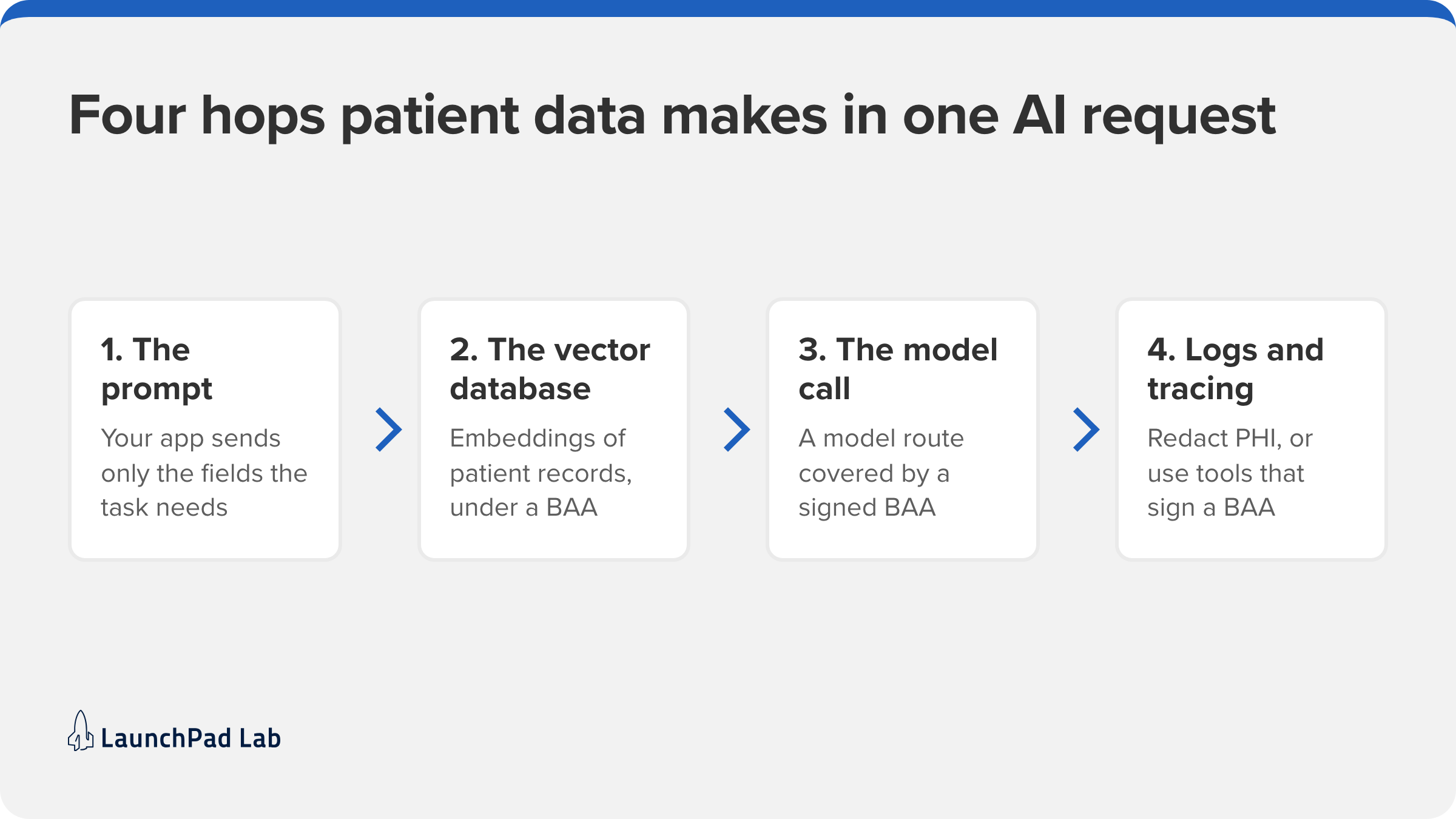
To apply it, follow one request. Say a nurse asks your feature to summarize a patient’s chart before a care review. Between that click and the summary on screen, the data makes four hops.
1. Decide what goes into the prompt
The first hop is inside your own app, where your code decides which parts of the chart go into the prompt. This is where minimum necessary becomes code: the nurse already knows the patient, so the name, record number, and address stay out.
Some tasks can skip PHI entirely. HHS allows two de-identification methods: Safe Harbor, which removes 18 types of identifiers, and Expert Determination, where a qualified expert confirms the risk of identifying anyone is very small (HHS). After that, the data “is no longer considered protected health information.” That’s hard for a single chart, since dates count as identifiers and free-text notes often contain names. It suits tasks like classifying documents or spotting trends across patients better. Combining datasets can also re-identify people, so keep the BAA when you can’t be sure.
2. Treat your vector database like any other patient record
Next, the feature looks up the notes it needs. Retrieval features turn records into embeddings, numeric versions of text that let the system search by meaning, and store them in a vector database.
HHS hasn’t addressed embeddings. We treat embeddings built from patient records as PHI, since they’re derived from it and usually stored beside the source text. So the vector database needs a BAA too, which Pinecone, for example, offers “upon request” (Pinecone). Scope each search to the patient in the request, so another patient’s notes never reach the prompt.
3. Only send prompts to a model covered by a BAA
Now the trimmed prompt and the retrieved notes go to the model. A HIPAA-compliant LLM setup sends that prompt to a large language model (LLM) through a route covered by a signed BAA, with the retention setting the vendor requires. That could be the OpenAI API, Claude through Anthropic or Microsoft Foundry (Microsoft’s platform for hosted models), or a model in Amazon Bedrock inside your own AWS account. The route is an architecture decision, and it’s one of the first things we settle when we scope AI software development for a healthcare team.
4. Keep PHI out of logs, error tracking, and tracing
The summary appears on the nurse’s screen, but copies of the request may still be sitting elsewhere. This is the hop teams often miss. Prompts and responses land in application logs, error reports, and the tracing tools developers use to debug the model. Either redact PHI before logging anything, or use tools that sign a BAA, as Datadog does for its HIPAA-eligible services. On our HIPAA builds, every third-party service, logging tools included, is checked for a BAA before any PHI can reach it.
When a hop fails the test, the fix is always one of two: get a BAA for that service, or stop sending it PHI.
What this looked like on a real claim review project
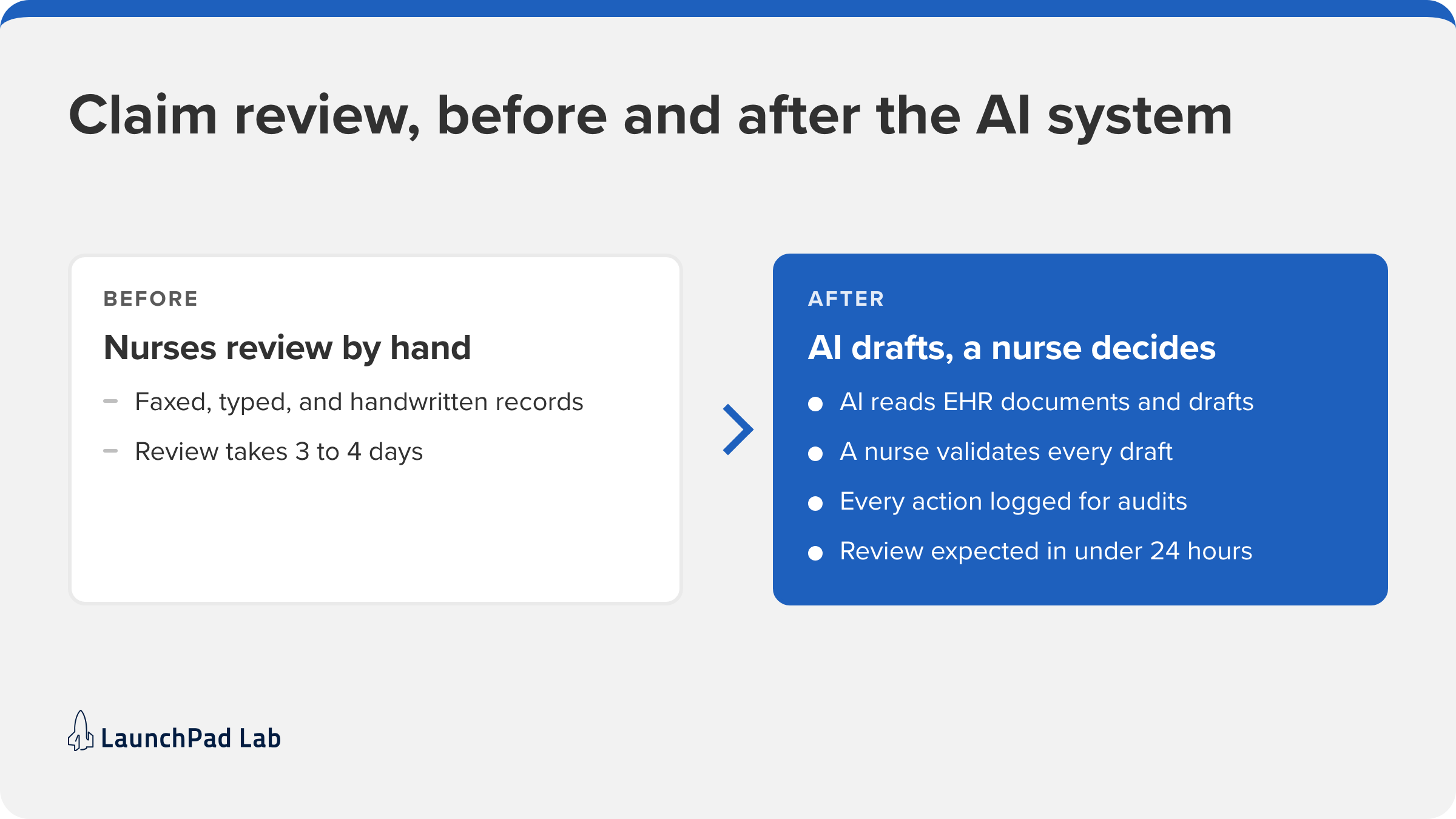
We saw the same hops on a claim review system we built for a healthcare insurance platform. Its nurses reviewed faxed, typed, and handwritten records by hand to decide medical necessity, under strict HIPAA and audit requirements. After a Blueprint Workshop (our structured planning sessions) with clinical, compliance, and IT stakeholders, we built an AI system on the OpenAI API that drafts determinations for nurses to review. Two parts of it map onto the hops, and a third keeps a person in the loop:
- The prompt and the model call. AI reaches PHI only through model providers covered by a BAA, and gets the minimum PHI the task needs.
- The logs. The system logs every action with audit-friendly formatting.
- The decision. The AI reads electronic health record (EHR) documents and checks each case against Milliman Care Guidelines, a widely used set of medical necessity criteria. A nurse validates every draft.
Review turnaround is expected to drop from 3 to 4 days to under 24 hours, and the AI is performing with an 85 to 90% accuracy rating (case study). Plenty of review teams are still where this one started, reading scanned records by hand. Turning that pile into drafts a reviewer can check is the kind of project our AI automation services team takes on.
How do you make an AI-built prototype HIPAA-compliant?
Treat the prototype as a first draft. An app built in Cursor or Lovable can prove an idea works, but it usually wasn’t built with patient data in mind. Once real patients are on the calendar, review it like any other system that handles PHI.
Does HIPAA apply to AI-generated code?
Yes. HIPAA governs how the finished system handles PHI, not who wrote the code, so AI-written code faces the same Security Rule safeguards. In the AI-built prototypes we review, those safeguards are usually where the gaps are.
What to fix before real patients use it
Work through these before the first real patient record goes in:
- Get a BAA from every vendor in the prototype’s path, including the model.
- Move it to HIPAA-eligible hosting, meaning a cloud provider that signs a BAA.
- Add authentication, role-based access, encryption, and audit logging.
- Check where prompts and errors get logged, and redact them.
- Delete any test data copied from real patient records.
That’s the work behind our HIPAA-compliant software development, including a HIPAA-compliant portal we delivered for Digital Dental Solutions in under 3 months.
Where to start
HIPAA-compliant AI comes down to one exercise you can do this week. Draw the data flow for a single AI feature, from the moment patient data enters a prompt to the moment it lands in a log. Mark every service it touches. Next to each one, write the BAA that covers it, or the de-identification step that keeps PHI away from it.
Any service with neither is your first fix. Sometimes that means requesting a BAA, and sometimes moving to a different plan or vendor. If you’d like help drawing the map, our Blueprint Workshop does it with your clinical, compliance, and IT leads, and our AI consulting team helps you decide where AI fits next. Book a Blueprint Workshop, or talk to our team about your AI feature.
Frequently asked questions
Is AI prohibited by HIPAA?
No. HIPAA regulates how protected health information is used and protected, not which technology handles it. Is AI HIPAA compliant, then? Only when it meets the Privacy Rule and the Security Rule’s five technical safeguard standards, with a business associate agreement (BAA) covering every vendor that sees protected health information (PHI).
Is there a HIPAA certification for AI?
No. HHS says it “does not endorse or otherwise recognize private organizations’ ‘certifications'” under the Security Rule, which sits in 45 CFR Part 164 (HHS). A “HIPAA certified” badge is the vendor’s own claim. Ask for the signed business associate agreement (BAA) instead.
Do you need a BAA if you de-identify data before it reaches the model?
Not for the de-identified data itself, which HHS no longer treats as protected health information (PHI). You still need a business associate agreement (BAA) for every service that sees the data before it’s de-identified, including any tool doing the de-identification for you.